

Before · the workbooks
TenureBook — by Dopara
Every occupier, lease and key date in one book.
Arrears, facilities and documents beside them — and board packs and reports that draft themselves from your own figures, so the admin that used to eat your week runs itself.
Runs a live commercial-property portfolio in the UK today.
Runs a live commercial portfolio today, and reads New York’s own published filings.
Before and after
A spreadsheet can hold your portfolio. It cannot keep it straight.
This is not about being disorganised. It is about records spread across files that cannot talk to each other. Here is the same work, kept two ways.
After · TenureBook
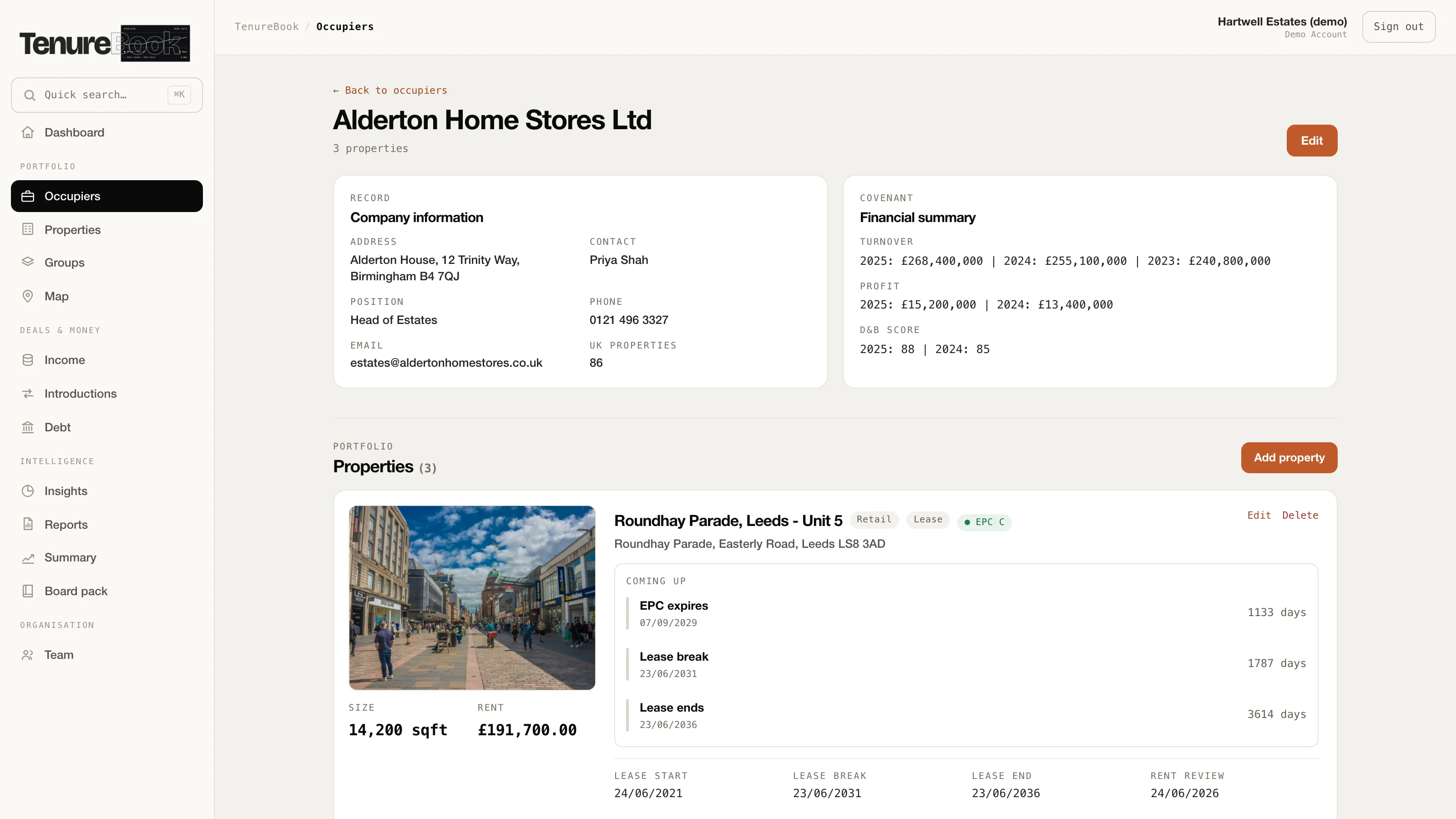
A break clause is a date in a cell. Nothing about it moves when it gets close.
The break date, the rent review and the EPC expiry count down on screen, each with the rent it puts at stake.
The same tenant appears in three files, and keeping them in step is somebody’s job.
One record per tenant, with every unit they hold underneath it. Change it once.
Answering “what are we owed?” means opening the files and adding them up again.
The rent roll and the arrears are totalled on the dashboard before you ask — arrears being what your team has marked as owed, since the book is not plugged into your bank.
Every board pack is rebuilt by hand, and is only as current as the last copy and paste.
The board pack rebuilds itself from your records every time you open it, figures and commentary both, and downloads as a document you can edit in Word, Pages or Google Docs.
One person really understands how the workbook fits together.
Everyone opens the same book, with admin, editor and viewer deciding who can change what.
Moving to anything else means retyping years of it, so nobody starts.
It starts from the spreadsheet you already keep — it knows the usual names for each column and does not mind what order they are in, asks you about any company it cannot place, and writes nothing until you say so.
One thing worth saying plainly: TenureBook shows you these dates on screen when you open it. It does not email you. We would rather tell you that here than let you assume otherwise.
One record, every screen
Type it once.
Not because it works harder — because every screen reads the same record. A change goes in one place, and nothing downstream has to be rebuilt.
Kept in separate spreadsheets
A rent review is agreed
- re-type The rent roll workbook
- re-type The key-dates sheet
- re-type The arrears tracker
- rebuild Last quarter’s board pack
Every file that holds it has to be edited, and the pack starts again from the top. Miss one and the figures disagree with each other.
Kept in one book
A rent review is agreed
- reads it The rent roll
- reads it The dates on screen
- reads it The portfolio map
- drafts it The board pack
One edit. The pack drafts its commentary from the same figures, for you to read, edit and approve.
The same is true in reverse: correct a lease once and every screen above is correct, because there is only one copy of it.
See it working
One book, every screen.
Swap between the screens your team lives in — the dashboard, the occupier book, the board pack and the portfolio map. Real screens from the product, on demo data throughout.
Just under three minutes, recorded on the live app — every screen, including bringing a spreadsheet in and taking one back out.
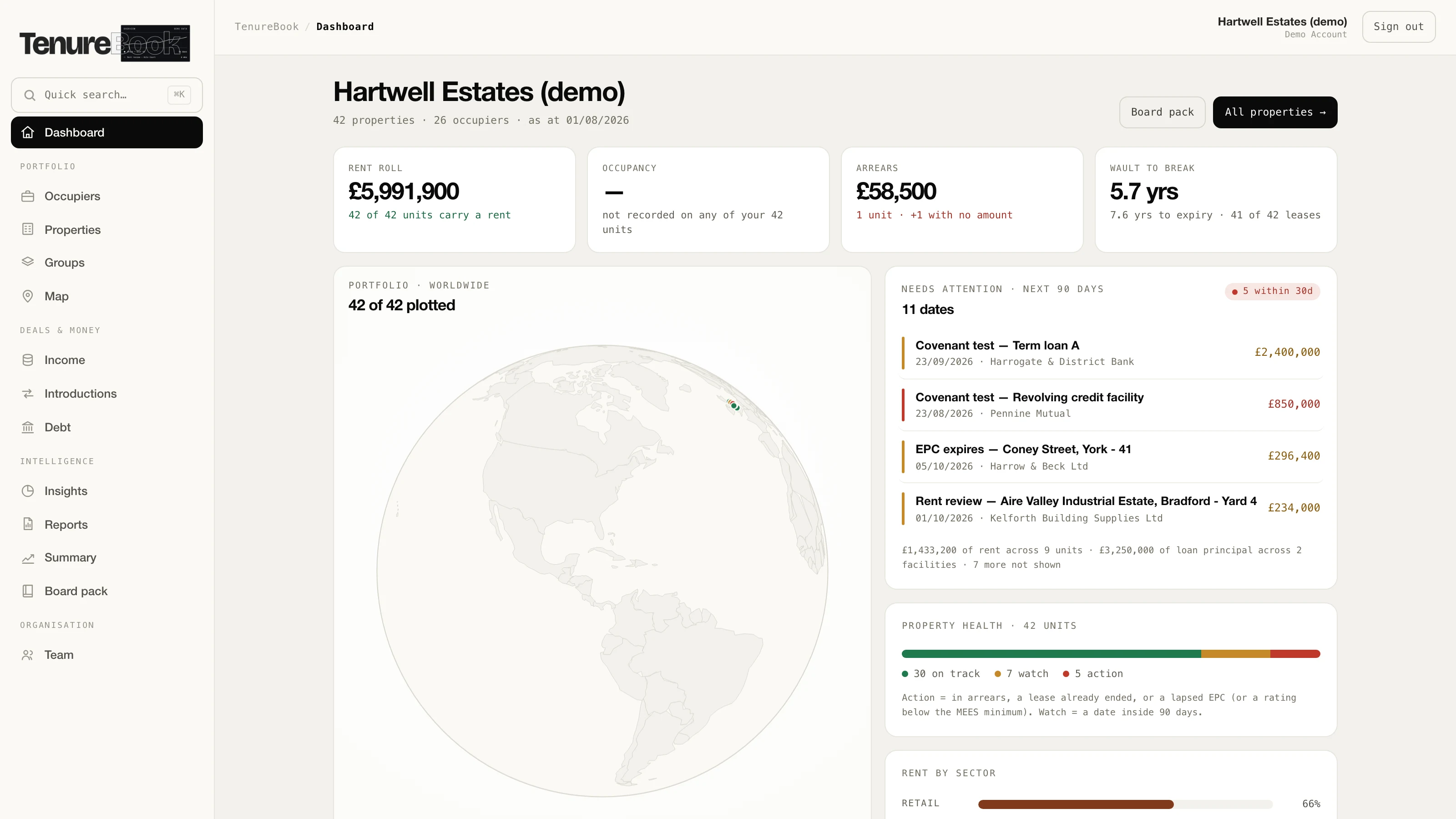
The real dashboard — the dates that cost money surface themselves, with days left on each.
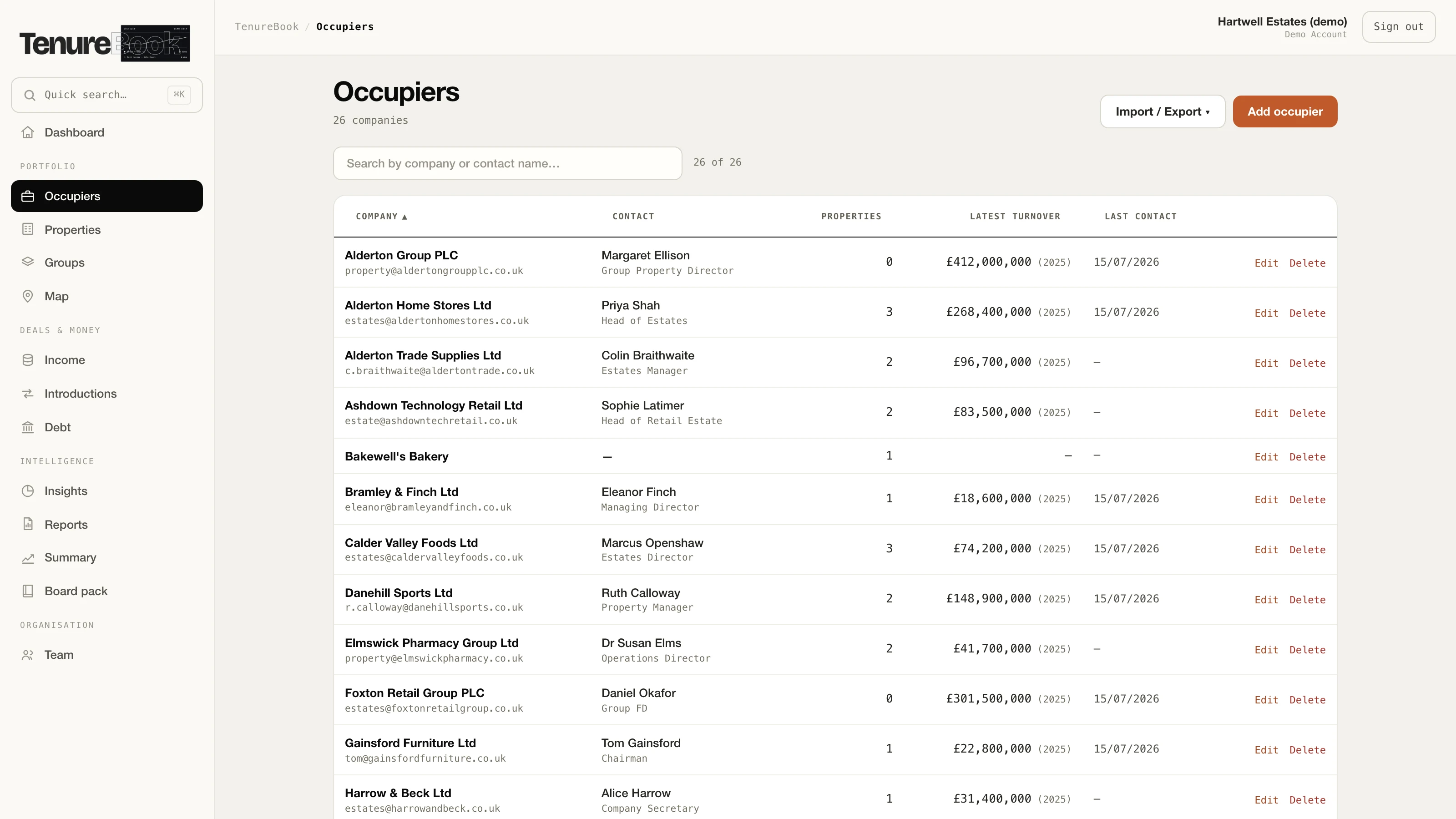
Every tenant, with the covenant behind them — sortable, searchable, and exportable to a spreadsheet.
One tenant, everything about them — the covenant behind the rent, a photograph of each unit, the dates counting down, and the lease and certificates attached.
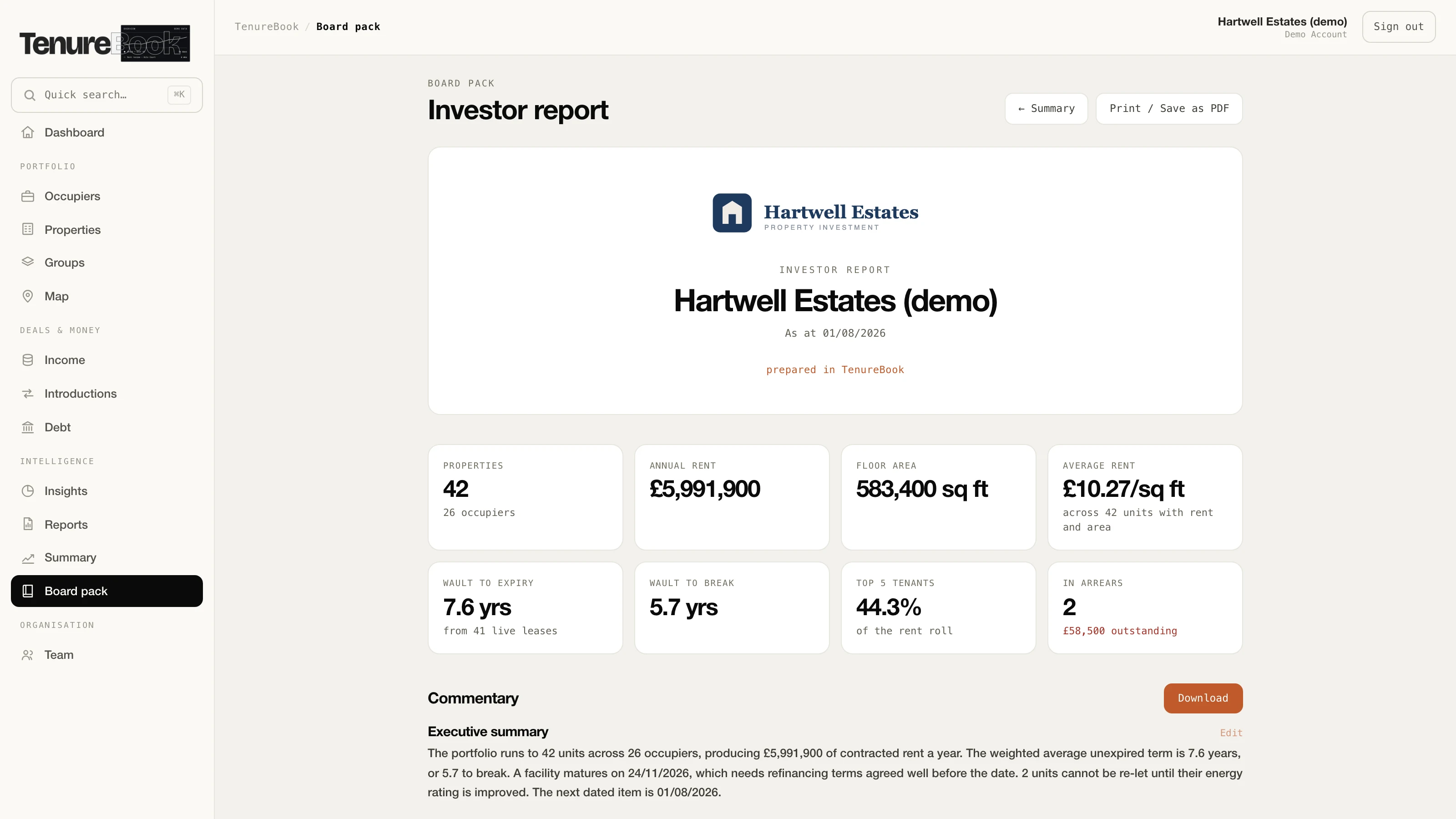
The pack drafts its commentary from your figures — you read, edit and approve every line. The logo on it is the Branded plan; on Standard the same pack comes out under ours.
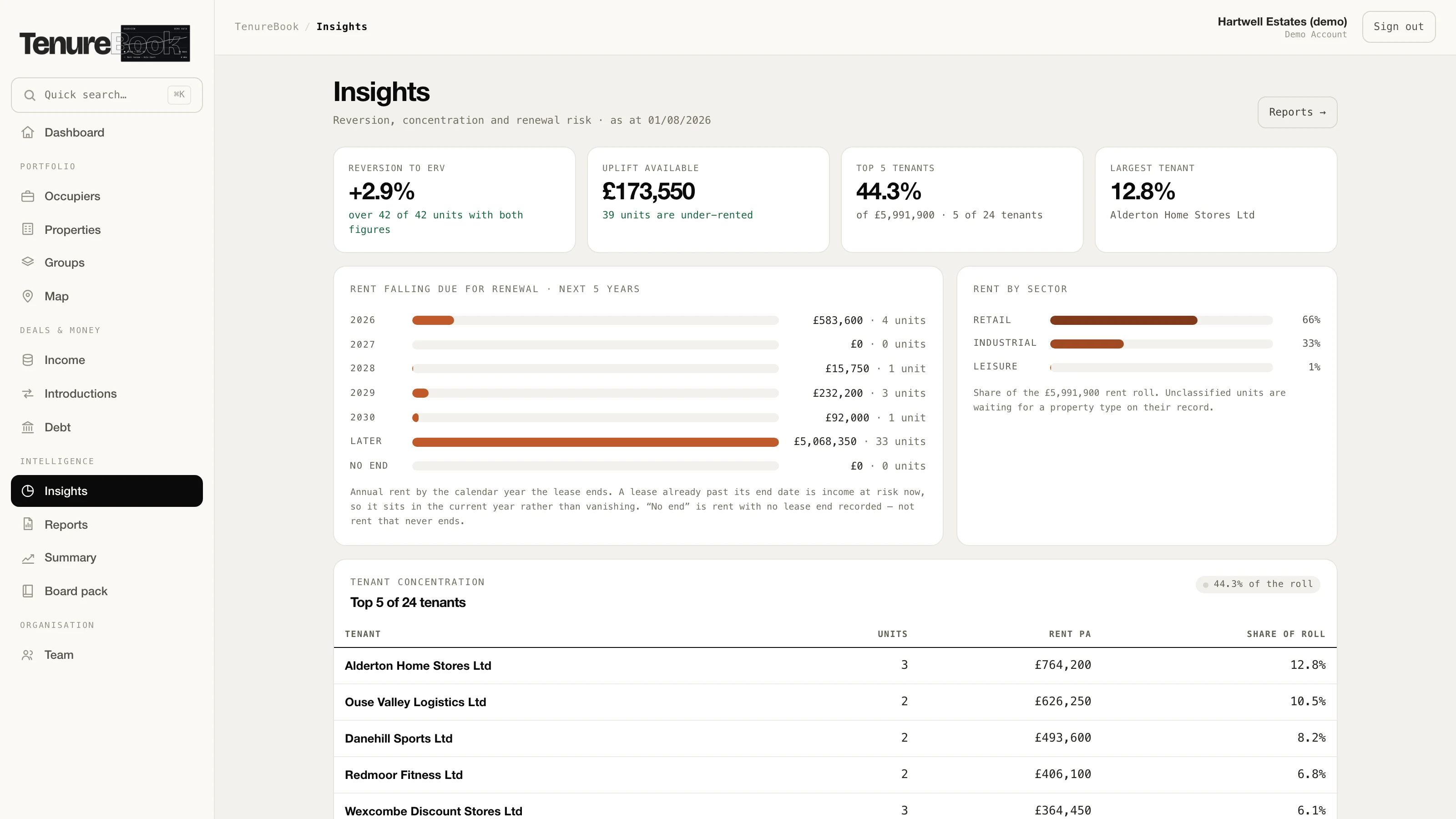
Where the money is concentrated, and what is coming up for renewal — each figure says how many units it was measured over.
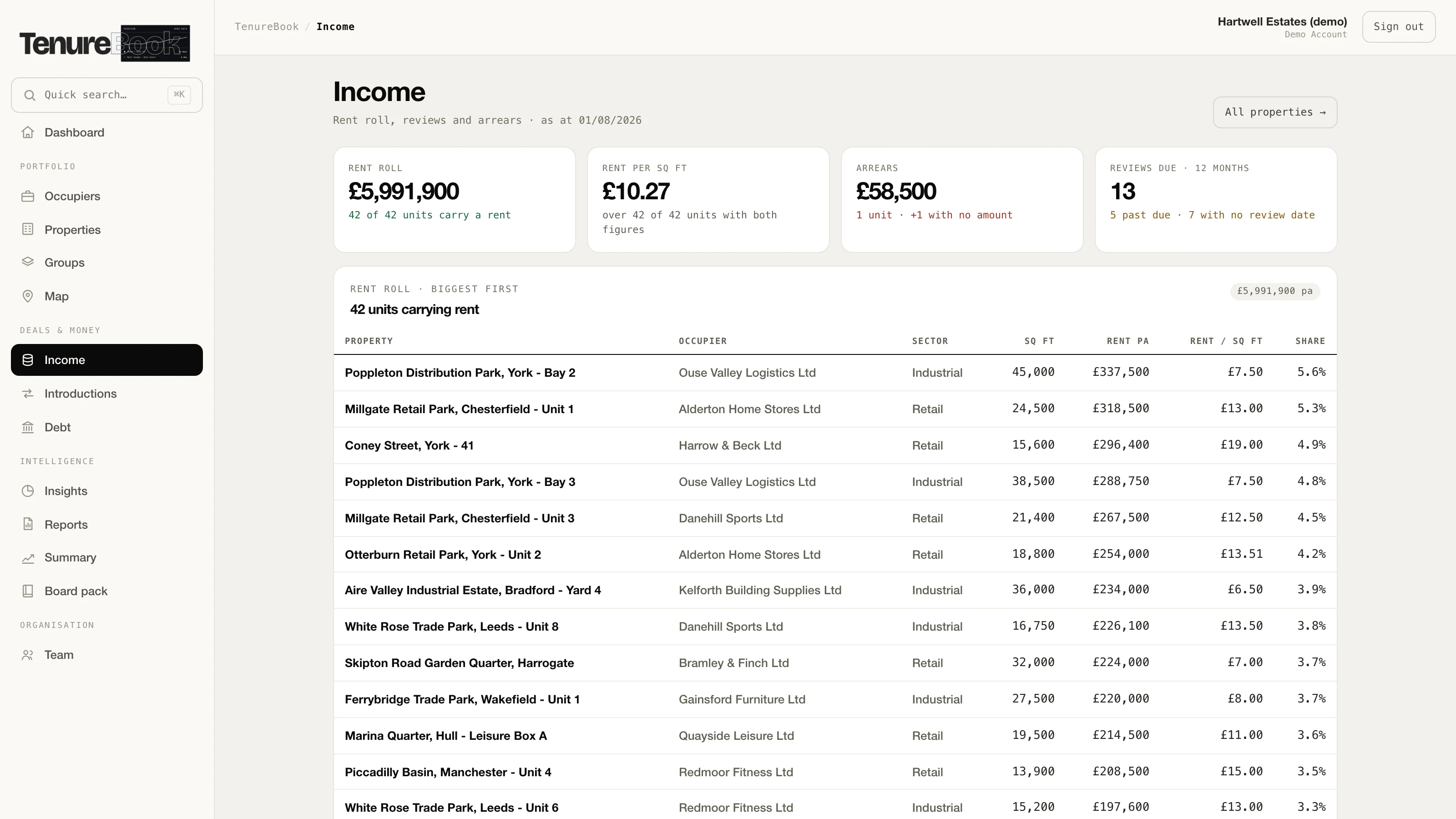
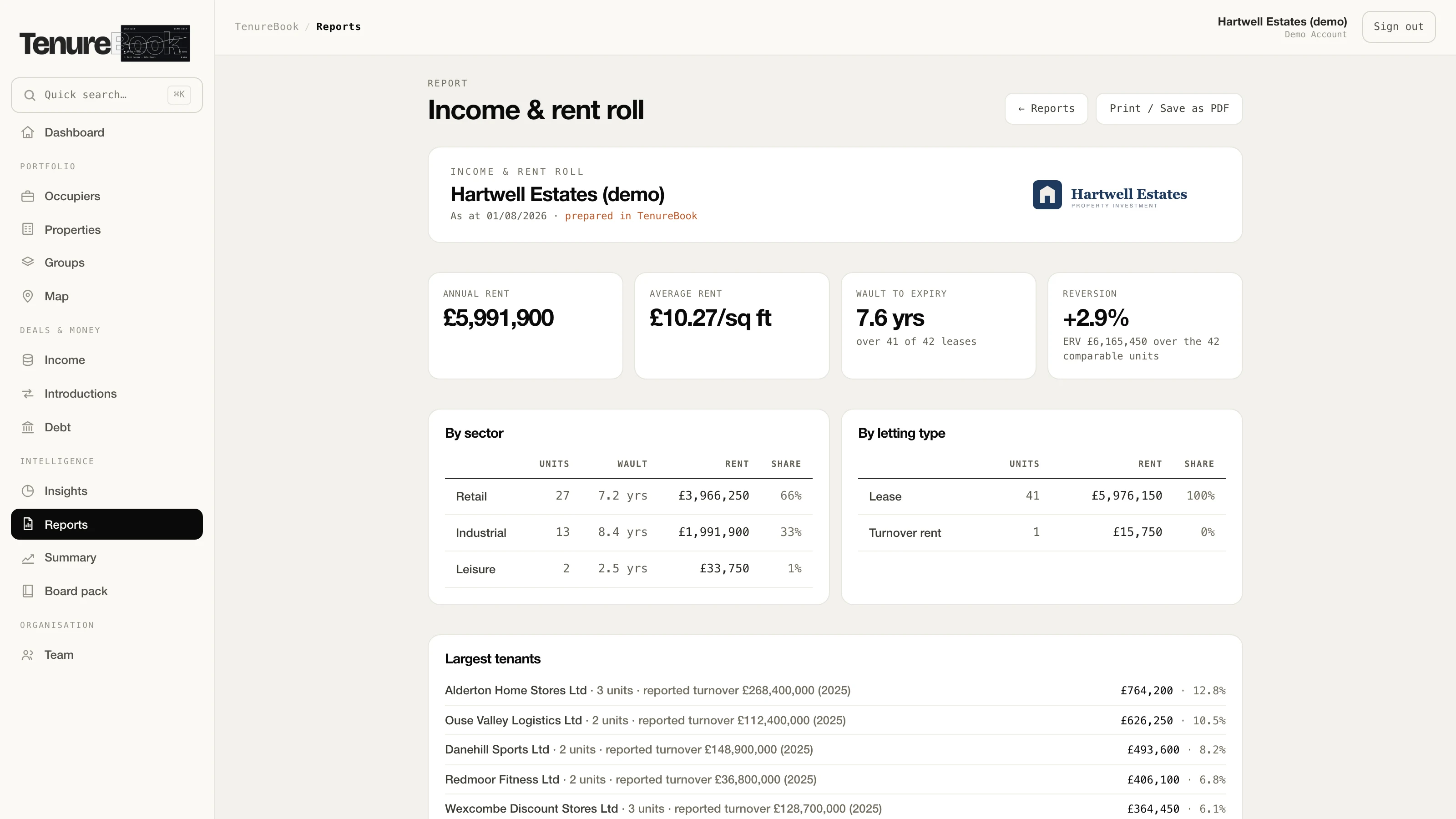
The rent roll, the reviews coming, and what is overdue — with the units that carry no rent counted separately rather than averaged in.
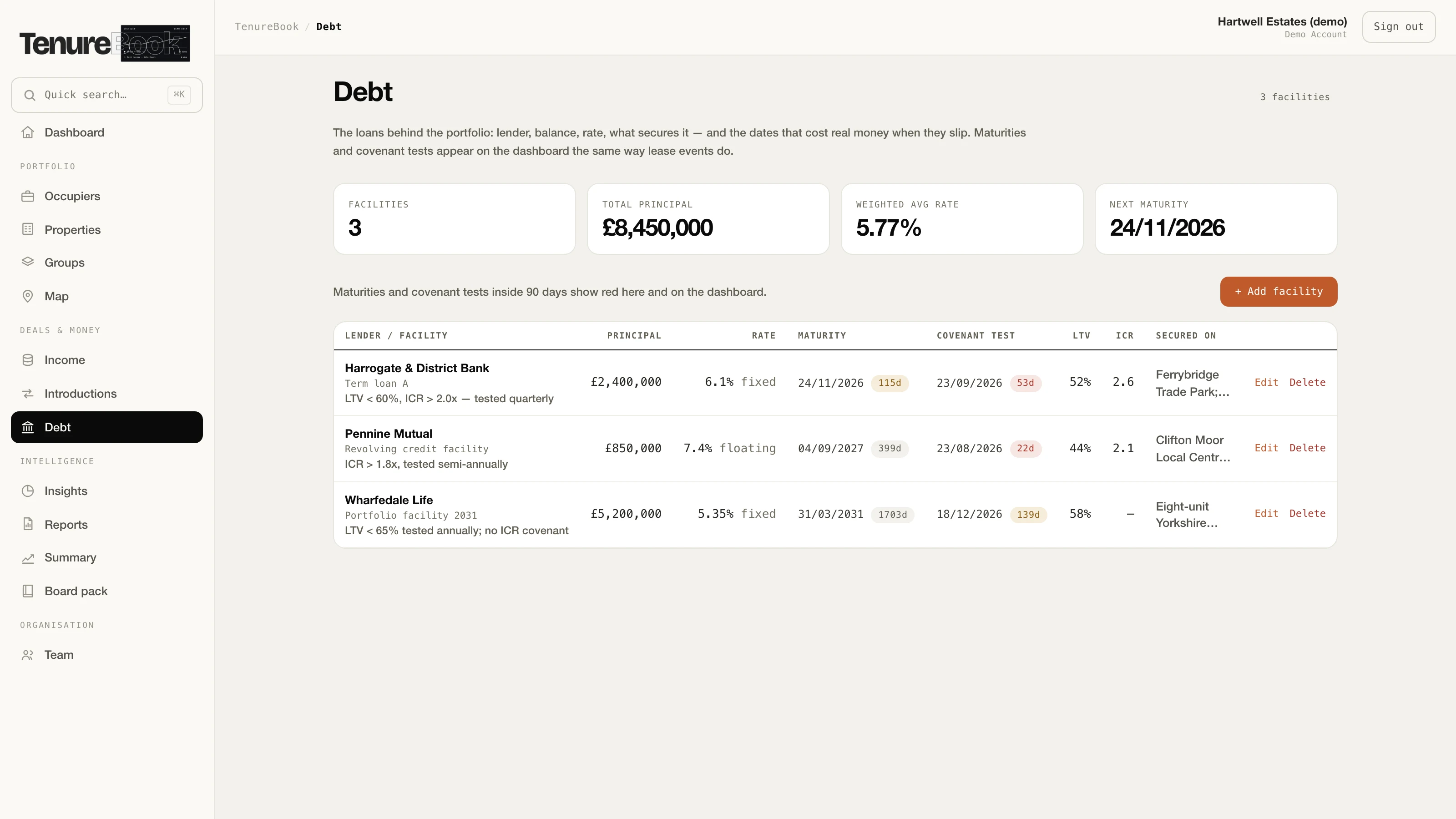
Every facility, its rate and its next covenant test — the dates that catch people out, in the same diary as the lease events.
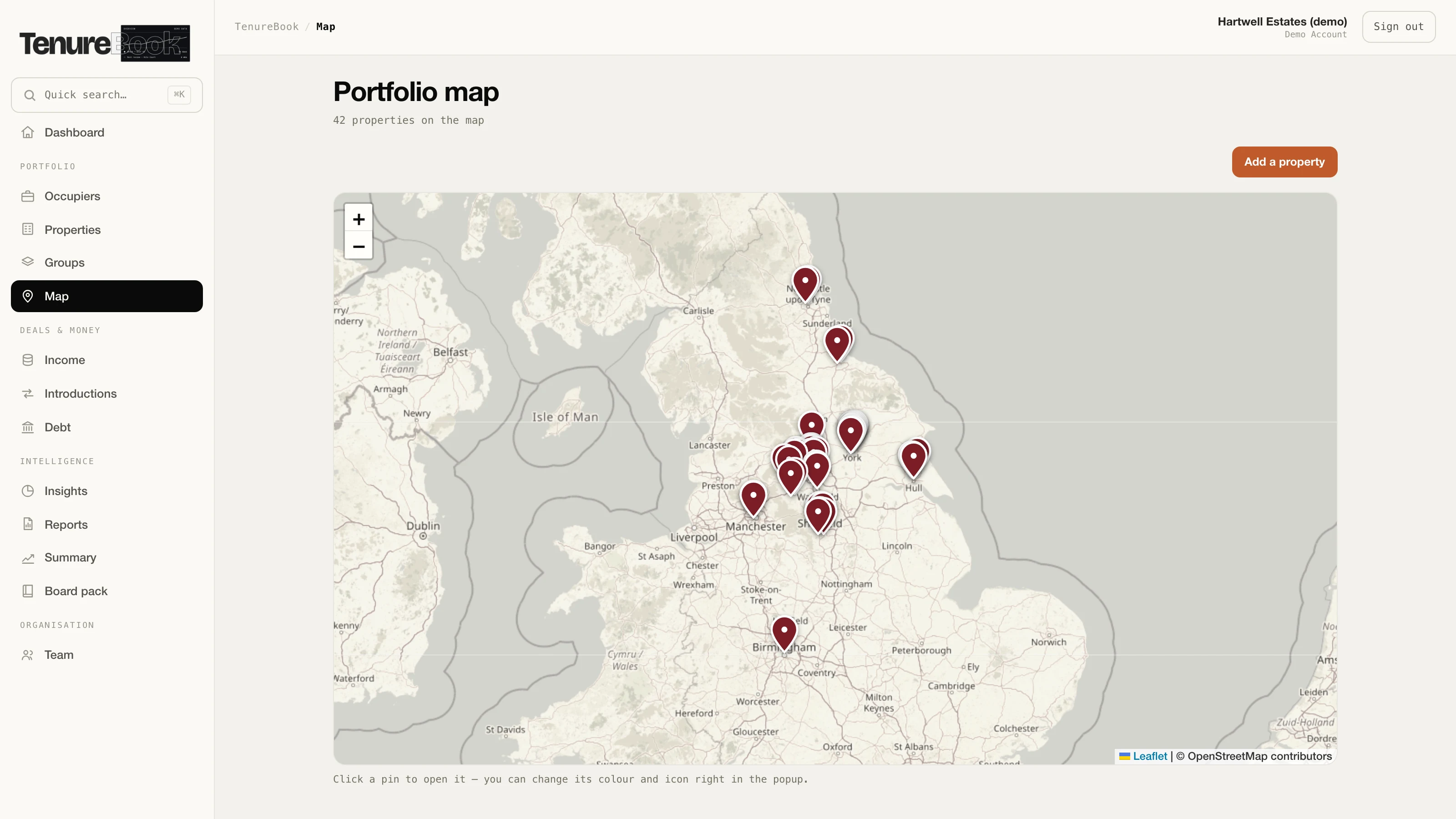
Real geography, not a diagram — click a pin to open the property, and set its colour and icon from there.
What it does
The whole book, and the dates that cost money waiting on screen when you open it.
Not a spreadsheet with opinions — a database with your entire portfolio in it, and the reports drafted for you at the end.
Feature 01
Your whole book
Every tenant, unit and lease sits in one connected book — rents, breaks, reviews and renewals, with the documents attached to the record they belong to. A live map plots the whole portfolio, and it reads in your country’s currency, dates and lease language — the UK, US, Ireland, Canada, Australia or New Zealand. When you add a unit you can upload the lease itself and have the terms read out of it into the form — the dates, the floor area and the rent — for you to check before anything is saved.
- Tenants
- Units
- Leases
- Documents
- Lease reader
- Portfolio map
- Multi-country
Feature 02
The deadline behind the date
Breaks, lease expiries, rent reviews, EPC deadlines and covenant tests are tracked the moment you enter them — and so is the deadline sitting in front of each one. Give a break its notice period and TenureBook works out the last day you can serve, and shows you the windows that have already closed while the break itself is still ahead. It is a book you open rather than something that emails you.
- Breaks
- Expiries
- Rent reviews
- EPCs
- Covenants
Lease breaks, expiries and loan covenants are tracked the moment you enter them — and for a New York building, so is the compliance year the City sets for you. The Local Law 97 report and your benchmarking are both due 1 May and are two different filings. The registration renews 1 September. The window guard notice goes to every unit in the first two weeks of January. TenureBook surfaces each one well before it lands.
- Local Law 97
- Benchmarking
- Registration
- Façade cycle
- Gas piping
- Breaks & expiries
Feature 03
Deals & debt
Your acquisitions pipeline and every finance facility live side by side — each loan with its rate, maturity, LTV and next covenant test. Watch deals move from offer to completion and see exactly what’s drawn, what’s due and where you stand.
- Pipeline
- Facilities
- Rate
- Maturity
- LTV
Feature 04
Reports that write themselves
KPIs, sector splits, arrears and debt draw straight from your live records into a board-ready pack — with the commentary written from your own figures in plain English for you to edit and approve. Export a clean report the moment the bank, the board or the auditor asks.
- Board packs
- Your logo
- Written commentary
- Editable
- One-click exports
Board packs & reports
The first draft writes itself. The last word is yours.
- 01Grounded in your figures. The commentary is written from your own records — the rent roll, the arrears, the key dates. It comes from the same arithmetic that prints in the tables, so it cannot state a number your figures do not show.
- 02You read and edit. Change any line you’d word differently, then print it. It’s your report, in your voice — and on the Branded plan it carries your logo.
- 03Nothing leaves unread. No figure and no sentence goes out of the building until you’ve approved it.
Free tool · New York City
Try the arithmetic on a real building before you buy anything.
If you hold property in New York, type an address into our Local Law 97 checker. It reads the City’s own published disclosure and tells you that building’s emissions limit, where it sits against it, when its next report is due, and what missing that date would cost. No sign-up, no card, nothing to give us.
The fine for not filing has nothing to do with your emissions
Going over the carbon cap is a boiler problem, and no software fixes it. Not filing at all is a diary problem — the penalty is charged on floor area, month after month, whatever the building actually emits. A spotless building that forgets the date is fined exactly as hard as a filthy one.
It will not guess
Every figure is New York’s published data with the statute applied to it. Where a building’s reported energy use isn’t physically plausible, or a limit can’t be verified against the rule itself, the tool says so instead of quoting you a number. That is the same rule the product runs on.
New York City only — Local Law 97 is a New York statute and this reads the City’s own benchmarking disclosure, which runs about a year behind. A reading of public data, not compliance advice.
New York City · compliance
Local Law 97 is one line in a long year.
The emissions report is due 1 May. So is your benchmarking, and they are two different filings. The registration renews 1 September. The window guard notice goes to every unit in the first two weeks of January. Somewhere in there sit a gas piping inspection on a four‑year cycle and a façade filing on a six‑year one, and neither falls in the same year for any two buildings.
TenureBook keeps that whole year, per building. The façade sub‑cycle it works out from the building’s tax block number, which is already in its lot number. The rest it builds from a short list of facts about each building — the community district, the story count, whether there is an elevator or a cooling tower — and where it has not been told one, it says so and asks rather than guessing. A diary that invents a deadline is one you stop trusting, and then it is worth nothing on the deadline that was real.
- 1 May · LL97 report
- 1 May · LL84 benchmarking
- 1 Sep · HPD registration
- Jan · window guard notice
- 21 Feb · façade (FISP)
- 31 Dec · gas piping
See what Local Law 97 costs your building
Free, and there is nothing to sign up for. Type an address and it reads the City’s own published data back to you — the building’s emissions limit, its next deadline, and what missing it would cost.
What is in it
What you get, and how to start.
Every plan is the whole product — the book, the on-screen key dates, the board packs, the reports. What differs is how many seats you get, whose logo the packs carry, and how much of the moving-in we do with you.
Standard
- Three seats.
- The whole product — the book, the map, on-screen key dates, imports and the board pack.
- Packs and reports come out under ours.
Branded Best value
- Seven seats.
- Everything in Standard.
- Your logo and colour on every pack and report.
- An onboarding call to set it up with you.
Custom
- Up to twenty seats.
- Everything in Branded.
- We move your spreadsheets across and set the book to your own conventions.
- Priority support and a named contact.
Tell us what you hold.
There is no price on this page on purpose. What a firm needs depends on how many properties it holds, how many people touch the records and how much of the moving-in we do with you — and we would rather work that out with you than have you guess from a table.
Fill it in and we will come back with what it would cost for a portfolio your size, and what moving your records across would involve. You do not have to take a call to get an answer.
Or write to help@doparagroup.com.
A person replies within one working day.
Cancel any monthExport the book to ExcelOnly your firm sees your bookUK-based & supported
Questions
The things people ask first.
Who writes the commentary in a board pack?
TenureBook does, from your own figures. The wording is generated from the same arithmetic that prints in the tables beside it, so it cannot state a number your records do not show, and it says it could not read something rather than reporting a zero. You edit and approve every line before it leaves.
Is my data private?
Yes. Every row is protected by row-level security, so a workspace only ever sees its own book. And you can export your occupiers, their properties and your contact notes to Excel at any time, or to JSON for every field held against them — your data is yours to take.
Can I import my spreadsheets?
Yes. The Excel import reads your existing columns and brings your book straight in. On the Custom plan, we do the first load with you and map your sheets to TenureBook.
How fast can we start?
Your workspace is set up quickly and it arrives empty — there is no sample portfolio to clear out and nothing to configure. The first thing you do is bring your own spreadsheet in. Nothing to install.